Difference between revisions of "PrF UG classes class browser"
| Line 12: | Line 12: | ||
<li><p> | <li><p> | ||
The | The | ||
| − | [[PrF_UG_classes_class_buttons|Class | + | [[PrF_UG_classes_class_buttons|Class buttons]] allow you |
to [[PrF_UG_classes_create_class|create]] | to [[PrF_UG_classes_create_class|create]] | ||
([[Image:PrF_UG_classes_class.create.gif|classes_class.create]]), | ([[Image:PrF_UG_classes_class.create.gif|classes_class.create]]), | ||
| Line 33: | Line 33: | ||
<li><p> | <li><p> | ||
| − | The [[PrF_UG_classes_class_window|Class Hierarchy | + | The [[PrF_UG_classes_class_window|Class Hierarchy window]] |
displays your class hierarchy. | displays your class hierarchy. | ||
[[PrF_UG_classes_class_icons|Icons]] | [[PrF_UG_classes_class_icons|Icons]] | ||
| Line 72: | Line 72: | ||
<li><p> | <li><p> | ||
| − | The [[PrF_UG_classes_superclasses_pane|Superclasses | + | The [[PrF_UG_classes_superclasses_pane|Superclasses pane]] |
allows you to | allows you to | ||
[[PrF_UG_classes_superclasses_pane#Adding_a_Superclass|add]] | [[PrF_UG_classes_superclasses_pane#Adding_a_Superclass|add]] | ||
| Line 86: | Line 86: | ||
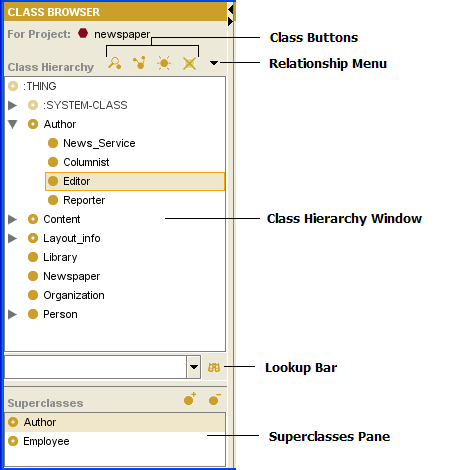
Image:PrF_UG_classes_class_browser.png|frame|none|Class Browser, "Editor" and "Author" selected | Image:PrF_UG_classes_class_browser.png|frame|none|Class Browser, "Editor" and "Author" selected | ||
rect 207 45 223 73 [[PrF_UG_classes_class_browser |The Class Browser]] | rect 207 45 223 73 [[PrF_UG_classes_class_browser |The Class Browser]] | ||
| − | rect 104 44 201 74 [[PrF_UG_classes_class_buttons |The Class | + | rect 104 44 201 74 [[PrF_UG_classes_class_buttons |The Class buttons]] |
| − | rect 263 24 373 47 [[PrF_UG_classes_class_buttons |The Class | + | rect 263 24 373 47 [[PrF_UG_classes_class_buttons |The Class buttons]] |
| − | rect 3 76 232 345 [[PrF_UG_classes_class_window |The Class Hierarchy | + | rect 3 76 232 345 [[PrF_UG_classes_class_window |The Class Hierarchy window]] |
| − | rect 263 208 428 230 [[PrF_UG_classes_class_window |The Class Hierarchy | + | rect 263 208 428 230 [[PrF_UG_classes_class_window |The Class Hierarchy window]] |
rect 2 353 383 383 [[PrF_UG_classes_find_class |Finding a Class]] | rect 2 353 383 383 [[PrF_UG_classes_find_class |Finding a Class]] | ||
| − | rect 2 388 234 469 [[PrF_UG_classes_superclasses_pane |The Superclasses | + | rect 2 388 234 469 [[PrF_UG_classes_superclasses_pane |The Superclasses pane]] |
| − | rect 264 424 398 450 [[PrF_UG_classes_superclasses_pane |The Superclasses | + | rect 264 424 398 450 [[PrF_UG_classes_superclasses_pane |The Superclasses pane]] |
rect 263 55 394 75 [[PrF_UG_classes_view_relations |Viewing Class Relations]] | rect 263 55 394 75 [[PrF_UG_classes_view_relations |Viewing Class Relations]] | ||
desc none | desc none | ||
Revision as of 15:56, October 26, 2008
The Class Browser
The Class Browser, at the left of the Classes tab, displays the classes in the knowledge base as a tree. The Class Browser includes the following:
The Class buttons allow you to create (
 ),
view/edit
(
),
view/edit
( ),
view references to
(
),
view references to
( ),
and delete
(
),
and delete
( ) classes
in your knowledge base.
) classes
in your knowledge base.
The Relations Menu (
 )
allows you to view relations between classes:
you can display the entire hierarchy (default)
or restrict the display only to those classes that are related to a selected class.
)
allows you to view relations between classes:
you can display the entire hierarchy (default)
or restrict the display only to those classes that are related to a selected class.
The Class Hierarchy window displays your class hierarchy. Icons give additional information about your classes. In this window, you can:
rearrange the class hierarchy using "drag-and-drop"; see Moving a Class for more information.
select a class to see its information displayed in the Class Editor to the right.
right-click a class to use the cascading Class Menu, which allows you to create, delete, and hide classes, as well as work with metaclasses.
The Class Lookup Bar allows you to find a class in the Class Relationship window by typing all or part of the class name and clicking the Search for Class (
 ) button.
The Superclasses pane allows you to add and remove superclasses for a class, as well as jump to a different superclass in the hierarchy view.


Click on a region or name in the illustration to jump to a description: