Difference between revisions of "PrF UG slots create slot"
| Line 2: | Line 2: | ||
== Creating a New Slot == | == Creating a New Slot == | ||
| − | {{PrF_UG_TOC_slots}}<div id='prf_ug'> | + | <noinclude>{{PrF_UG_TOC_slots}}<div id='prf_ug'></noinclude> |
A new slot is created with a generic name, such as newspaper_Slot_1. | A new slot is created with a generic name, such as newspaper_Slot_1. | ||
| Line 44: | Line 44: | ||
| − | </div> | + | <noinclude></div></noinclude> |
Latest revision as of 18:45, November 13, 2008
Creating a New Slot
A new slot is created with a generic name, such as newspaper_Slot_1. There are three ways to create a slot:
By clicking the Create Slot (
 )
Slot button in the Slot pane
of the Slots tab.
This creates a slot, but does not assign it to any class.
The slot can later be attached
to one or more classes.
)
Slot button in the Slot pane
of the Slots tab.
This creates a slot, but does not assign it to any class.
The slot can later be attached
to one or more classes.
By right-clicking in the Slot Browser in the Slots tab and selecting Create slot from the Slot menu. This is identical to the previous operation.
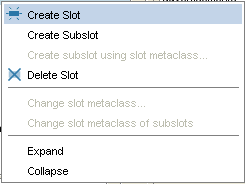 Slot menu, "Create Slot" selected
By selecting a class in the Classes tab and then clicking the Create Slot (
) button
in the Template Slots pane.
This creates a slot
and attaches it to the selected class.


You can use the Slot Editor to edit the properties of the slot.

