Difference between revisions of "PrF UG projects revert project"
From Protege Wiki
| (One intermediate revision by the same user not shown) | |||
| Line 2: | Line 2: | ||
== Reverting to an Archived Version of a Project == | == Reverting to an Archived Version of a Project == | ||
| − | {{PrF_UG_TOC_projects}}<div id='prf_ug'> | + | <noinclude>{{PrF_UG_TOC_projects}}<div id='prf_ug'></noinclude> |
You can revert to any archived version of your project. | You can revert to any archived version of your project. | ||
| Line 10: | Line 10: | ||
Select <b>Project | Revert to a Previous Version</b> | Select <b>Project | Revert to a Previous Version</b> | ||
or click the <b>Revert to a Previous Version</b> | or click the <b>Revert to a Previous Version</b> | ||
| − | [[Image:PrF_UG_projects_project.revert.gif|projects_project.revert]] button | + | ([[Image:PrF_UG_projects_project.revert.gif|projects_project.revert]]) button |
at the top of the {{#var:Pr}} window. | at the top of the {{#var:Pr}} window. | ||
</p> | </p> | ||
| Line 18: | Line 18: | ||
in the <b>Revert to Archived Version</b> dialog: | in the <b>Revert to Archived Version</b> dialog: | ||
</p> | </p> | ||
| − | <div>[[Image:PrF_UG_projects_archive_revert.png| | + | <div>[[Image:PrF_UG_projects_archive_revert.png|frame|none| |
| − | + | Revert to Archived Version dialog]]</div> | |
<li><p> | <li><p> | ||
| Line 32: | Line 32: | ||
| − | </div> | + | <noinclude></div></noinclude> |
Latest revision as of 18:36, November 13, 2008
Reverting to an Archived Version of a Project
You can revert to any archived version of your project.
Select Project | Revert to a Previous Version or click the Revert to a Previous Version (
 ) button
at the top of the Protege window.
) button
at the top of the Protege window.
All archived versions are displayed in the Revert to Archived Version dialog:
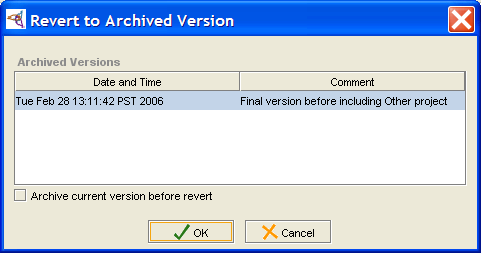 Revert to Archived Version dialog
Select the version you wish to revert to. If you wish, you can select to archive the current version before reverting.
Click OK.


